

User manual · Firmware 6.20 · November 2026
AS21 Altimeter
How to read the display, use the menu and the logbook, charge the AS21 and look after it. Read it all before your first jump with it.
01 · Safety
Safety warning and disclaimer
Skydiving can cause serious injury or death. The AS21 helps your altitude awareness, but it can fail and must never be your only source of altitude information.
Before you jump with the AS21
- Read this whole manual before your first jump with the AS21.
- Jump only with proper training, and follow the rules of your national association and your drop zone.
- Before every jump, check that the AS21 is on, reads 0 at the landing area and has enough battery.
- Always use the AS21 together with a second altimeter and your own view of the ground.
- Plan every jump so you can open at your planned altitude even if the AS21 shows nothing.
- If the AS21 shows no reading, a frozen reading or anything you cannot explain, stop using it and rely on your other altimeter and the ground.
- The AS21 does not replace an automatic activation device (AAD), your reserve or your training.
Why the reading can be wrong
The AS21 calculates altitude from air pressure. The reading can differ from your real height above the ground when:
- the weather changes between take-off and landing;
- the landing area is higher or lower than the place where the AS21 was set to 0;
- the aircraft cabin is pressurized, or air flows around your body in freefall (burble);
- the battery is low, or the AS21 has been hit, wet, or used outside −30 to 70 °C.
Disclaimer of liability
No electronic instrument is free of failure. 2Fly designs and checks the AS21 with care, but does not guarantee that it will work without errors or interruptions.
By using the AS21 you accept that skydiving is a dangerous activity and that you take part in it at your own risk. You are responsible for checking your equipment and for every decision you make in the air.
To the maximum extent permitted by the applicable law, 2Fly, its owners, employees, distributors and sellers are not liable for any injury, death, loss or damage, direct or indirect, that results from using the AS21, from its failure or from being unable to use it, before, during or after a jump.
Nothing in this manual limits the rights that the consumer law of your country gives you and that cannot be waived. If you do not accept these conditions, do not use the AS21.
02 · Parts
Getting to know the AS21
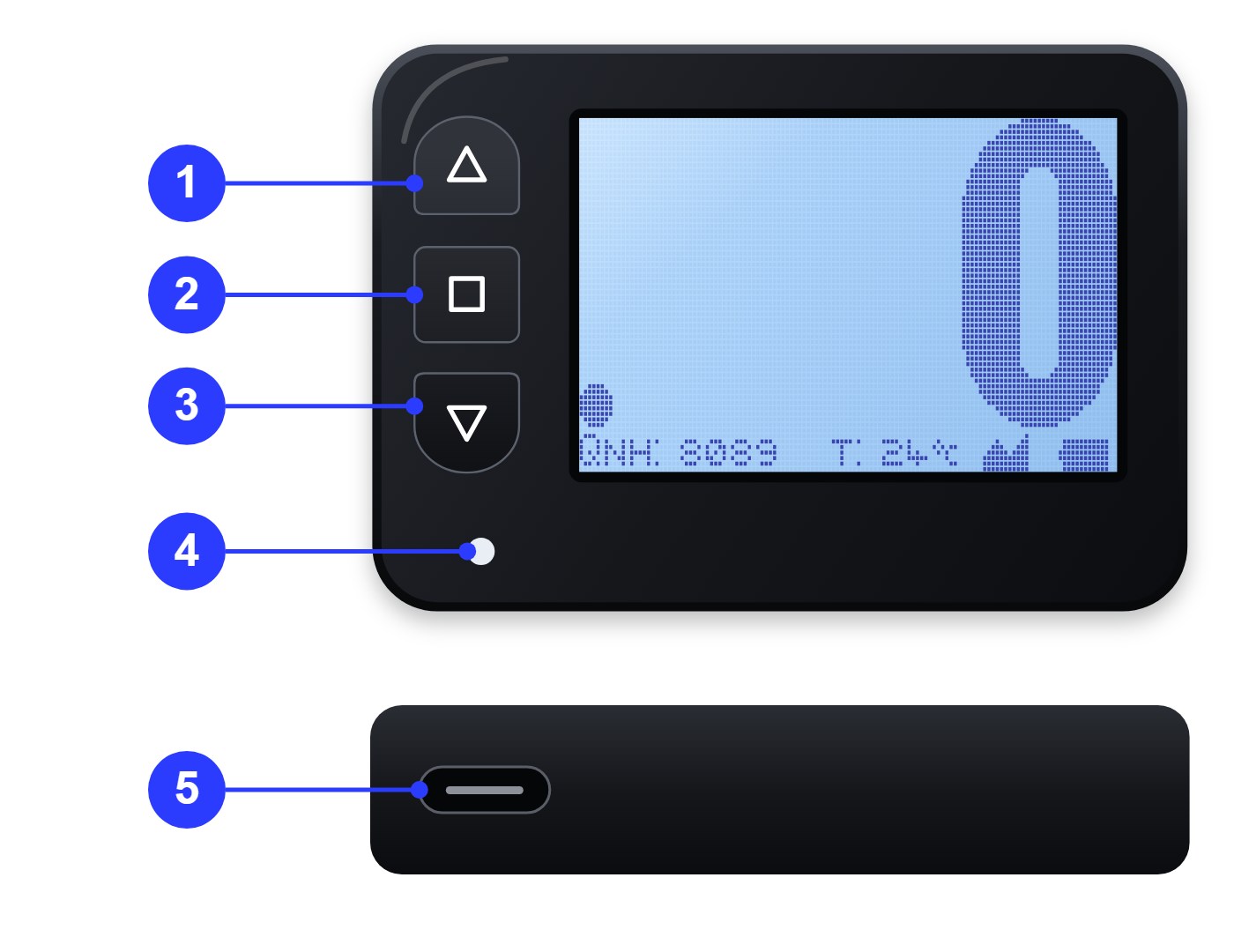
The AS21 has a 128 × 64 dot screen with backlight, three keys, an LED and a USB-C charging port. The numbers below match the drawing.
| # | Part | What it does |
|---|---|---|
| 1 | Up key | Moves up in the menu and to the next jump in the logbook. |
| 2 | Enter / power key | Turns the AS21 on, opens the menu and confirms a choice. |
| 3 | Down key | Moves down in the menu and to the previous jump in the logbook. |
| 4 | LED | Guides you into the menu and warns of low battery or a fault. |
| 5 | USB-C port (bottom edge) | Charges the battery. |
What the LED tells you on the altitude screen:
- Off: normal operation.
- A short flash every 1.5 seconds: low battery. Charge the AS21 before your next jump.
- On without stopping: the AS21 has detected a fault. Do not jump with it; contact 2Fly support.
03 · Display
The display
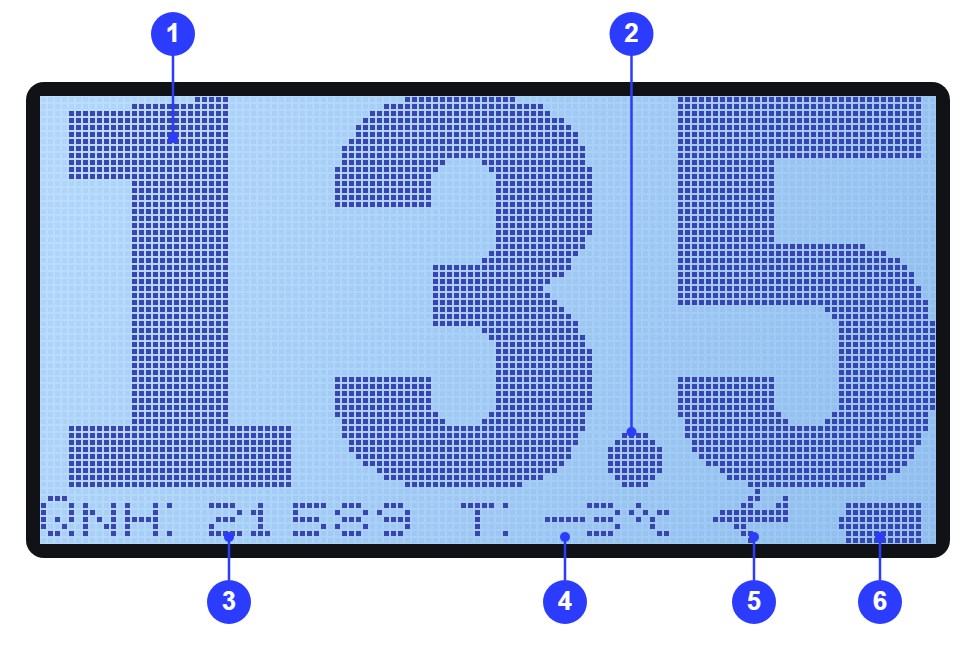
The big digits show your altitude above the point where the AS21 was set to 0, always in thousands of feet. The line at the bottom shows altitude above sea level, temperature, the phase of the jump and the battery.
The four altitude formats
The decimal point moves so the digits stay large:
| Screen | Means | When |
|---|---|---|
| 13.5 | 13,500 ft | 10,000 ft and above, in steps of 100 ft |
| 5.50 | 5,500 ft | 1,000 to 9,999 ft, in steps of 10 ft |
| .850 | 850 ft | 200 to 999 ft, in steps of 10 ft |
| . 0 | Ground level | Below 200 ft |

Below 200 ft the AS21 always shows 0. Fly your landing pattern by looking at the ground, not at the altimeter.
The bottom line
| Item | Example | What it shows |
|---|---|---|
| QNH | QNH:8089 | Your altitude above sea level, in feet |
| T | T:24°c | Air temperature, in °C |
| Phase icon | Aircraft, freefall, canopy or ground | The part of the jump the AS21 has detected |
| Battery | Five levels | Remaining charge |
Phase icons
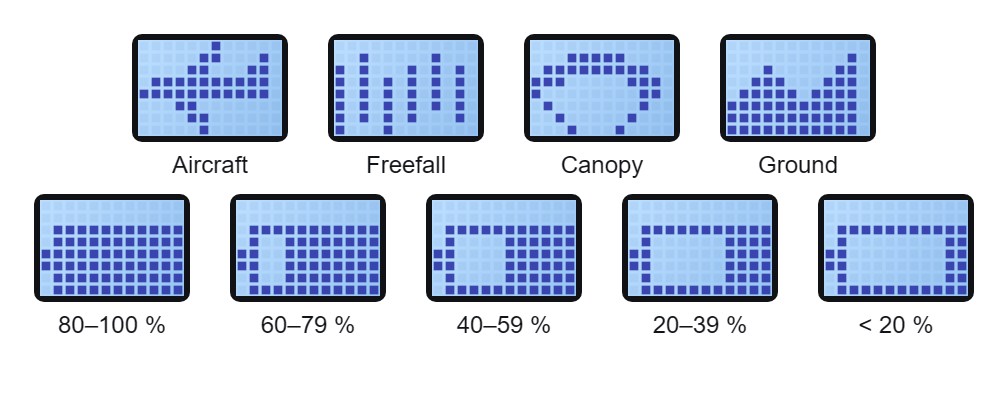
- Aircraft: appears once you climb above 500 ft.
- Freefall: appears a few seconds after you start falling fast.
- Canopy: appears a few seconds after your fall slows down under canopy.
- Ground: appears when you land, below 150 ft under canopy. The AS21 saves the jump in its logbook at this moment.
Battery levels
The battery icon has five steps: 80–100 %, 60–79 %, 40–59 %, 20–39 % and under 20 %. Below about 20 % the LED starts to flash. When the battery is empty, the AS21 turns itself off.
04 · Getting started
Getting started
Charge the AS21 fully, turn it on at the drop zone and check that it reads 0 before you board.
Charging
- Connect a USB-C cable to the port on the bottom edge. Depending on the model, a red charging LED lights up or the battery icon on the screen changes while it charges.
- Use a standard USB charger or a computer's USB port. Do not use a fast charger: damage from fast charging is not covered by the warranty.
- Charge at room temperature, away from heat and moisture.
- Charge fully before your first use and whenever the LED starts to flash.
A full charge lasts about 3 months of intensive use with the backlight off. The backlight shortens this time.
Turning it on and off
- On: press Enter briefly. The AS21 sets 0 at the place where you turn it on, so turn it on at the level of the landing area.
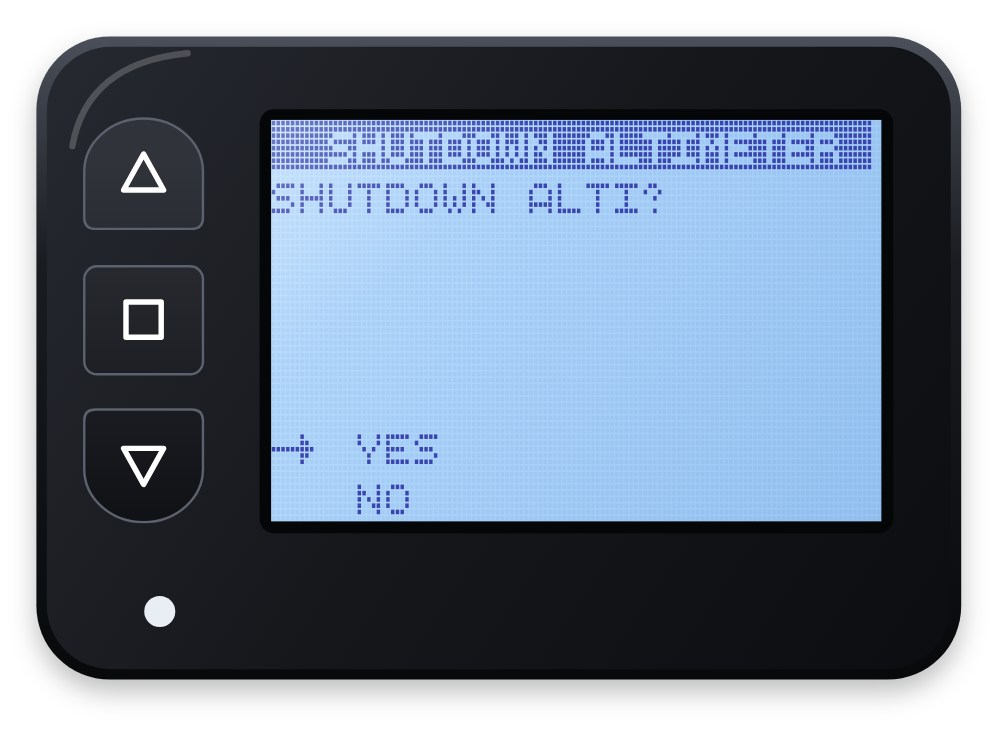
- Off: open the menu, choose SHUTDOWN ALTIMETER and confirm YES. The AS21 saves your settings and shows SEE YOU SOON!
- Automatic off: after 12 hours on the ground without pressing Enter, or when the battery is empty.
When you turn it on, the AS21 shows the 2FLY logo while it starts, then the altitude screen.
Language
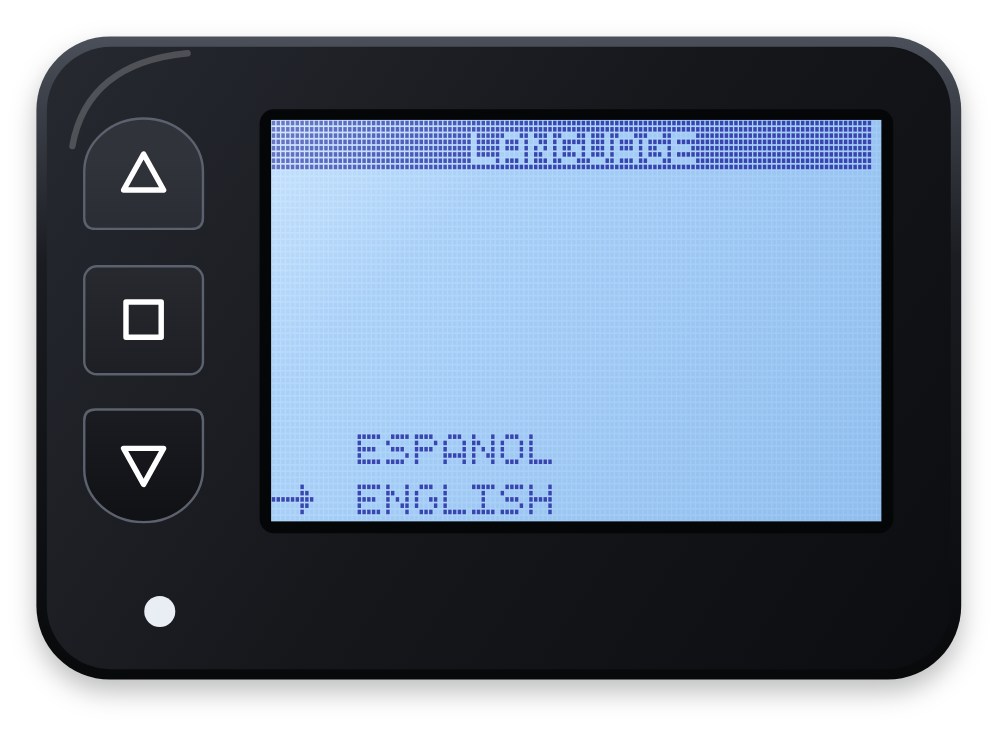
The menus are in English or Spanish. Choose one under LANGUAGE in the menu (see Menu and settings).
On the ground, before every jump
- Check that the screen shows . 0 at the level of the landing area.
- If it does not, stand at landing-area level and choose ZERO ALTITUDE in the menu.
- If the landing area is higher or lower than where you are, set the altitude offset (see Menu and settings).
- Check the battery icon. Do not jump if the LED is flashing or on without stopping.
While the AS21 stays within 100 ft of 0 for about 7 minutes, it sets 0 again by itself. This corrects slow changes in air pressure on the ground, but it is not a substitute for the check above.
05 · Jump
During the jump
The AS21 needs no key presses during the jump. It detects each phase by itself and records the jump when you land.
| Phase | What you see | What the AS21 does |
|---|---|---|
| In the aircraft | Aircraft icon; the digits climb, for example 5.50 then 13.5 | Starts a new jump once you pass 500 ft |
| Freefall | Freefall icon; the digits drop | Measures your freefall time and top speed |
| Under canopy | Canopy icon | Notes the opening altitude and measures your canopy time |
| After landing | Ground icon and . 0 | Saves the jump in the logbook |
While the menu is open, the AS21 does not show your altitude. Always go back to the altitude screen (EXIT) before you board, and do not open the menu in the air.
06 · Menu
Menu and settings
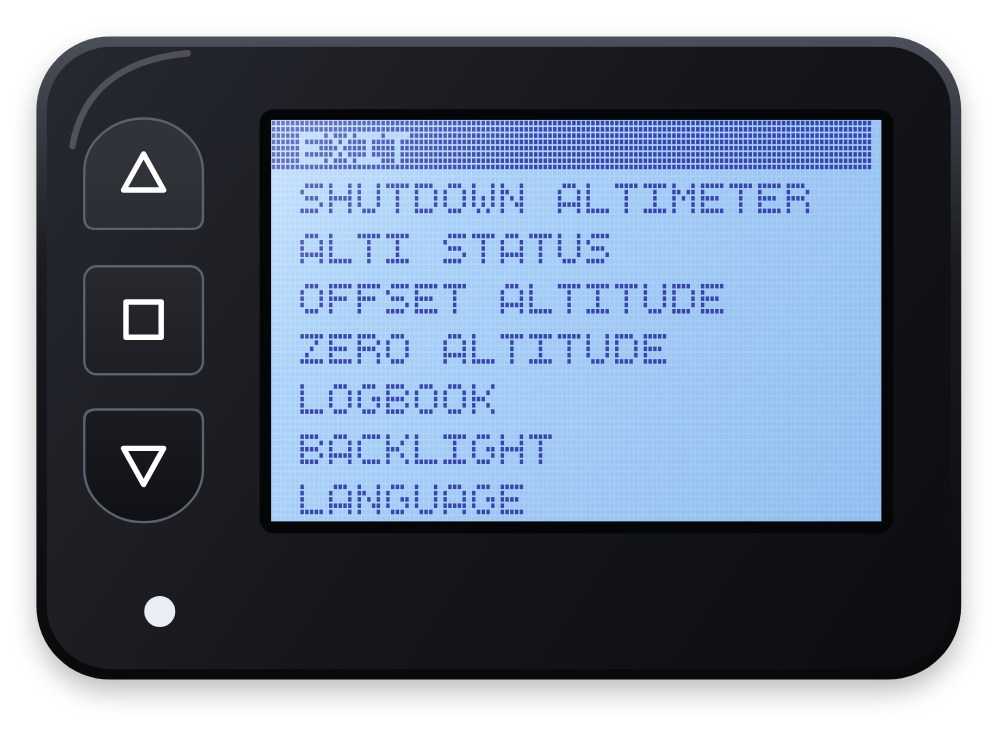
Open the menu on the ground with three presses of Enter, each one while the LED is lit. The sequence keeps the menu from opening by accident.
Opening the menu
- On the altitude screen, press Enter once.
- After about 1 second the LED lights up. Press Enter again while it is lit; the LED turns off.
- When the LED lights up again, press Enter a third time. The menu opens.
The LED stays lit for about 1.5 seconds. If you press too early or too late, start again from step 1.
Moving around
- up and down move the highlighted line. The list wraps from the last option to the first.
- Enter opens the highlighted option or confirms a choice.
Menu options
| On screen (English) | On screen (Spanish) | What it does |
|---|---|---|
| EXIT | SALIR | Returns to the altitude screen. |
| SHUTDOWN ALTIMETER | APAGAR ALTIMETRO | Turns the AS21 off after you choose YES. NO returns to the menu. |
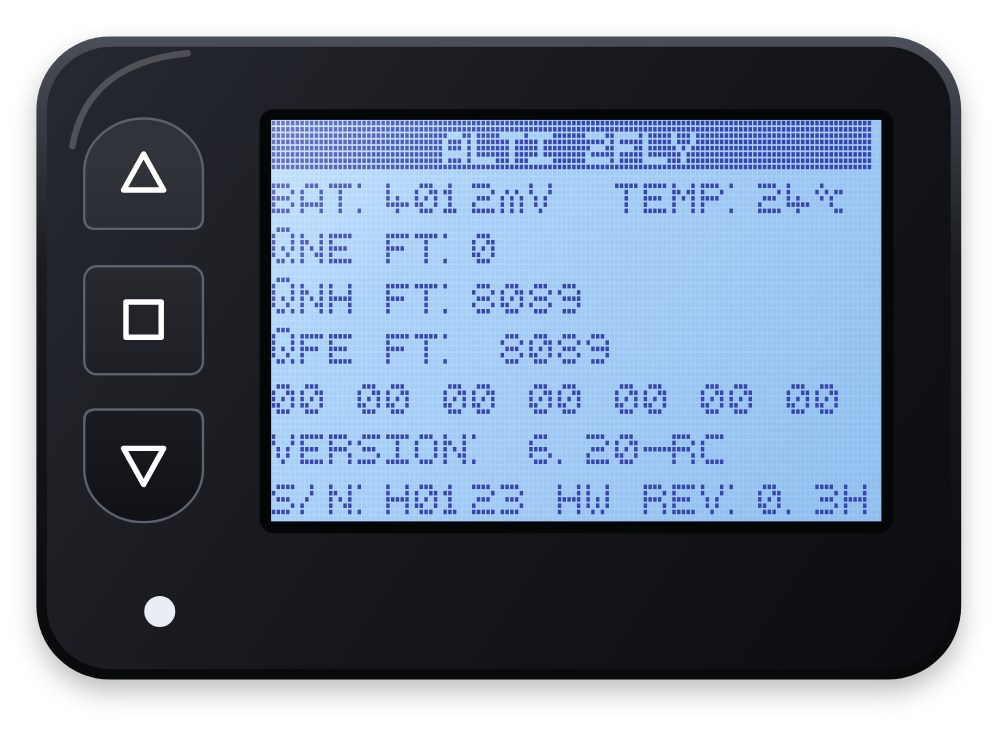
| ALTI STATUS | ESTADO DEL ALTIMETRO | Shows battery, temperature, altitudes, firmware version and serial number. |
| OFFSET ALTITUDE | OFFSET ALTITUD | Corrects for a landing area higher or lower than the 0 point. |
| ZERO ALTITUDE | ALTITUD CERO | Sets 0 at your current altitude and returns to the altitude screen. |
| LOGBOOK | LOGBOOK | Shows your saved jumps. |
| BACKLIGHT | LUZ DE FONDO | Turns the backlight on or off. |
| LANGUAGE | IDIOMA | Switches the menus between English and Spanish. |
Status screen
Press Enter to return to the menu.
| Line | What it shows |
|---|---|
| BAT and TEMP | Battery voltage in millivolts and temperature in °C |
| QNE FT | Your altitude above the 0 point |
| QNH FT | Your altitude above sea level |
| QFE FT | The elevation of the 0 point above sea level |
| Row of codes | Diagnostic codes for 2Fly support |
| VERSION | Firmware version |
| S/N and HW REV | Serial number and hardware revision |
Altitude offset
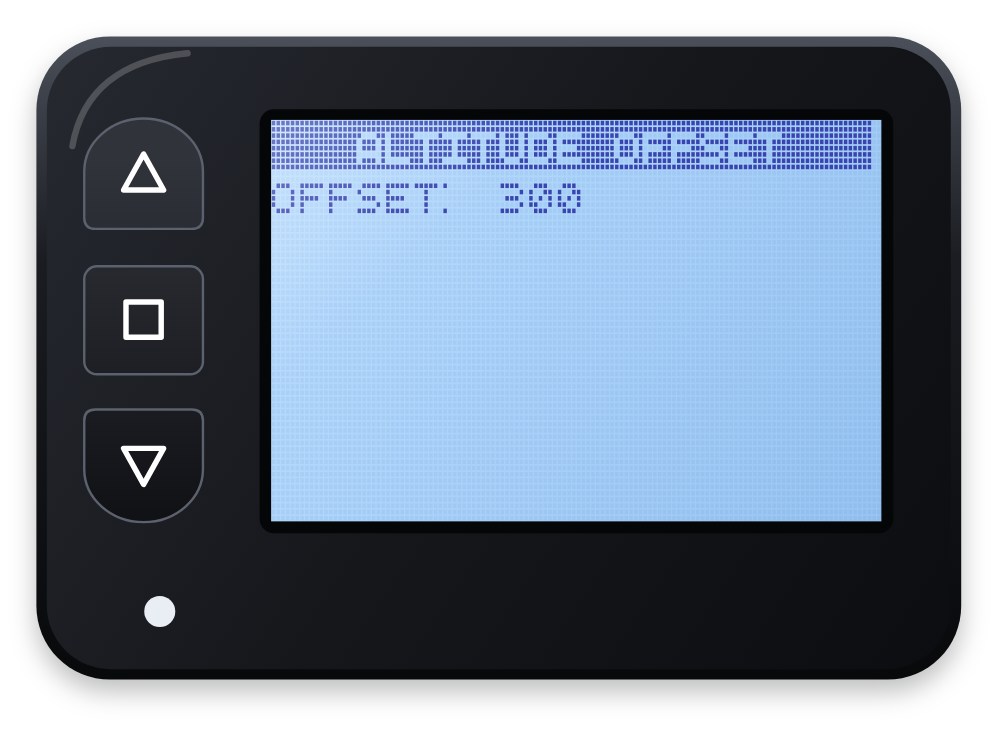
Use the offset when you land somewhere higher or lower than the place where the AS21 was set to 0. For example, the aircraft takes off from an airport 300 ft below the landing area.
- Hold up to raise the offset or down to lower it, in steps of 10 ft.
- Positive means the landing area is higher than the 0 point; in the example, set OFFSET: 300.
- Press Enter to save and return to the altitude screen.
Check the offset before every jump, and set it back to 0 when you no longer need it.
Backlight and language
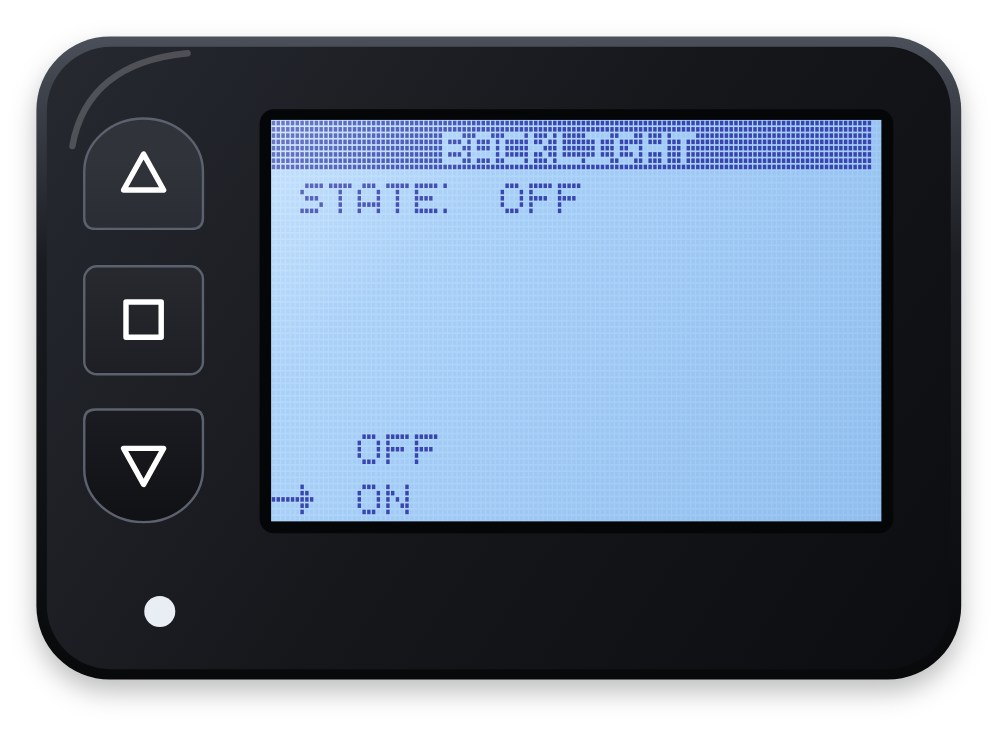
Both screens show two choices with an arrow (->). Move the arrow with up or down and press Enter to confirm. The backlight uses more battery, so turn it on only when you need it.
07 · Logbook
Logbook
The AS21 saves a summary of every jump in its own memory when you land, with room for about 3,000 jumps. It does not send jumps to a phone or a computer.
Reading the logbook
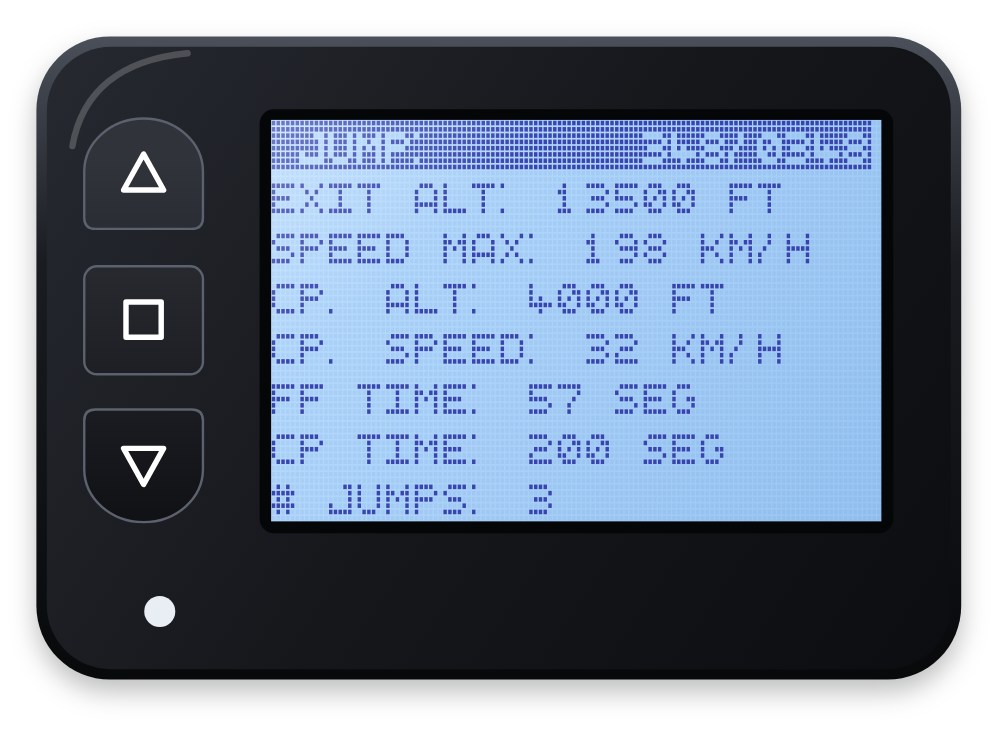
- Open LOGBOOK in the menu. The top line shows JUMP: n/total, the jump on screen and the number of jumps saved.
- up shows the next jump and down the previous one. The list wraps around.
- Enter returns to the menu.
- If no jump has been saved yet, the screen shows NO DATA.
What each jump stores
| On screen | Meaning | Unit |
|---|---|---|
| EXIT ALT | Exit altitude | ft |
| SPEED MAX | Top speed in freefall | km/h |
| CP. ALT | Opening altitude | ft |
| CP. SPEED | Top speed under canopy | km/h |
| FF TIME | Freefall time | seconds |
| CP TIME | Canopy time | seconds |
| # JUMPS | Jumps since you turned the AS21 on, usually today's jumps | jumps |
Exit and opening altitudes are estimates, calculated from the moment the AS21 detects freefall and canopy. Use them as a reference, not as exact measurements.
08 · Care
Care, battery and storage
Keep the AS21 dry, charged and within −30 to 70 °C, and check it on the ground after any hard knock.
- Battery: the AS21 has a rechargeable 3.7 V, 300 mAh lithium-polymer battery. A full charge lasts about 3 months of intensive use with the backlight off. Charge it only through the USB-C port, with a standard charger, never a fast charger.
- Before each jump day: charge it, check the battery icon and look at the status screen.
- After a hard knock or a water landing: turn it off, let it dry and check it on the ground. If anything looks wrong, contact 2Fly support before you jump with it again.
- Cleaning: wipe it with a soft, slightly damp cloth. Do not use solvents.
- Air travel: turn it off. In a pressurized cabin it shows the cabin altitude, not the real one.
- Long storage: charge it to about half, turn it off and keep it in a cool, dry place. Recharge it every few months.
- Repairs: do not open the AS21. There are no parts inside that you can service yourself.
09 · Specifications
Technical specifications
| Item | AS21 |
|---|---|
| Dimensions without mount | 58.1 × 40.5 × 12 mm |
| Weight without mount | 32.0 g |
| Battery | Rechargeable lithium polymer, 3.7 V, 300 mAh |
| Battery life | About 3 months of intensive use with the backlight off |
| Charging connector | USB Type-C |
| Display | FSTN LCD, 128 × 64 dots, visible area 39.8 × 23 mm, with backlight |
| Operating temperature | −30 to 70 °C |
| Operating altitude | −100 to 11,000 m above sea level (−328 to 36,089 ft) |
| Resolution | 0.2 m (20 cm) |
| Accuracy | ±100 ft (±30 m) |
| Sensor sampling rate | 5 Hz minimum |
| Units on screen | Altitude in feet, speed in km/h, temperature in °C |
| Logbook | About 3,000 jumps |
| Languages | English, Spanish |
| Firmware described | Version 6.20 |
| Warranty | 1 year against manufacturing defects |
10 · Warranty
Warranty
2Fly covers the AS21 against manufacturing defects for one year from the date of purchase.
The warranty does not cover damage caused by:
- water or moisture;
- knocks, drops or crushing;
- charging with a fast charger;
- opening, modifying or repairing the AS21 anywhere other than 2Fly;
- not following the instructions in this manual.
It does not cover normal wear either, such as scratches on the case or the screen.
To make a claim, contact 2Fly through www.2fly.com.co. Have your proof of purchase and the serial number (S/N) from the status screen at hand.
This warranty does not limit the rights that the consumer law of your country gives you.